


Table of Contents
Cloud file sharing, Microsoft Azure and Amazon Web Services workloads, remote access, SaaS apps, backups, and user permissions now sit close to daily work. Your tickets, invoices, approvals, customer records, and support queues all depend on clean access and trusted files.
That makes cloud malware an operational risk, not only an IT issue. Global telemetry recorded 6.06 billion malware attacks in 2023, and over 560,000 new pieces of malware are detected daily. A malware cloud issue can delay customer service, expose data, lock files, and interrupt workflows your staff uses all day.
Willis Cantey, CEO at Cantey Tech Consulting, notes: “Review cloud risk where work actually happens, inside permissions, shared folders, backups, and user tickets, so response protects uptime instead of chasing alerts after damage spreads.”
Cloud Malware Risks Hidden Inside Everyday Cloud Workflows
Most cloud risk starts inside ordinary work. A shared folder, email link, browser session, file sync tool, identity login, or admin approval can become the path that moves a suspicious file or exposes access.
Cantey Tech Consulting reviews workflows through tickets, permissions, files, devices, and user behavior so suspicious activity is caught before it turns into billing delays, missed customer handoffs, or stalled approvals. Malware downloads have originated from 167 cloud apps, which shows why routine workflows need close review instead of blind trust.
-
Shared file exposure: A vendor attachment lands in a finance folder, then moves through collaboration tools before anyone confirms it is safe.
-
Identity misuse: Stolen credentials let an attacker enter SaaS apps, view records, and change permissions.
-
Sync tool spread: A suspicious file in one synced folder reaches laptops and cloud storage.
-
Approval chain disruption: Locked accounts delay HR approvals, invoice reviews, and operations requests.
What this looks like in practice: a finance user opens a vendor attachment, a synced folder pushes the file to several devices, and a help desk ticket is created. Access is restricted while the issue is reviewed. Cantey Tech Consulting supports more than 350 businesses and maintains a 75% first call resolution rate, so its service desk process is built around fast routing and clear next steps.
The business impact shows up fast when response is not coordinated across support, access control, file review, and cloud monitoring.
Malware Cloud Warning Signs Your Team Should Not Ignore
A user reports slow access to shared cloud files. Another ticket mentions missing folders. Then a third user sees unusual login prompts while opening a customer record.
Early signs often sit in different places: support queues, endpoint alerts, cloud logs, and user complaints. Pattern recognition speeds triage and lowers downtime, especially when nearly 80% of detected threats use malware-free techniques that mimic normal user behavior.
-
Unusual login activity: Watch for unfamiliar locations, repeated failures, or impossible travel patterns.
-
Unexpected file changes: Renamed, encrypted, deleted, or duplicated files need immediate review.
-
Repeated access prompts: Extra reauthentication requests can signal token or session issues.
-
Endpoint alert clusters: Several devices flagging the same file or process points to spread.
-
Support ticket patterns: Similar complaints across finance, HR, and operations deserve escalation.
Cantey Tech Consulting uses service desk certified technicians as direct points of contact, backed by local support teams and 24/7 assistance. Its 75% first call resolution rate helps route issues faster with fewer handoffs, cleaner tickets, and clearer next steps for the people waiting on access.
Clean triage sets up containment.
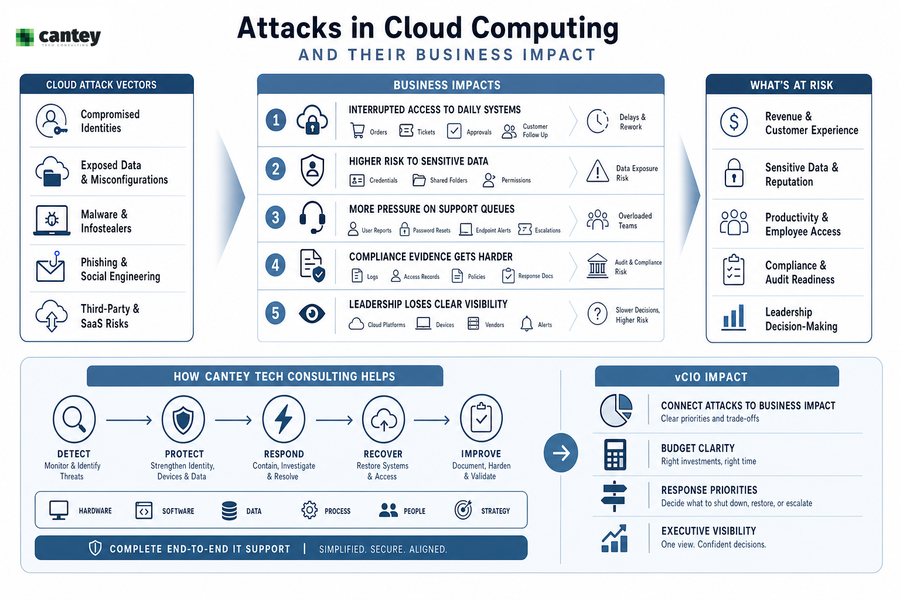
Attacks In Cloud Computing And Their Business Impact
Cloud incidents affect approvals, customer response, billing, employee access, compliance evidence, and leadership decisions.
-
Interrupted access to daily systems: Locked accounts, blocked files, and quarantined devices slow orders, tickets, approvals, and customer follow-up.
-
Higher risk to sensitive data: Exposed credentials, shared folders, and unmanaged permissions increase the chance that customer, employee, or financial data gets accessed. Infostealer attacks increased by 58% in 2024, which makes identity control a business priority.
-
More pressure on support queues: Repeated user reports, password resets, endpoint alerts, and escalation tickets can overwhelm internal teams. Global telemetry recorded 6.06 billion malware attacks in 2023, so clear ticket ownership matters when issues hit multiple users.
-
Compliance evidence gets harder: CMMC, NIST, HIPAA, PCI, and SOX all depend on organized logs, access records, policies, and response documentation. If those records live across disconnected vendors and inboxes, reviews take longer.
-
Leadership loses clear visibility: Scattered alerts across cloud platforms, devices, and vendors make it harder to decide what to shut down, restore, or prioritize. Cantey Tech Consulting’s vCIO guidance connects attacks in cloud computing to budget clarity, risk acceptance, and response priorities.
Cantey Tech Consulting reduces vendor complexity with complete end-to-end IT support across hardware, software, data, process, people, and strategy. With one vendor and one invoice, you get a clearer path for cloud access, endpoint cleanup, backup review, compliance documentation, and executive decision making.
More Cloud Security Reads
Cloud-Based Malware Response Steps That Reduce Downtime
Change is difficult during an incident because users need access, leaders need answers, and IT teams need clean evidence. A defined response process helps you move faster without risky shortcuts.
These are practical next steps, not a replacement for a formal incident response plan.
-
Confirm the scope: Review endpoint alerts, cloud platform logs, authentication history, and affected user reports in one ticket trail.
-
Contain risky access: Reset passwords, disable risky sessions, apply conditional access rules, and isolate affected devices.
-
Protect clean backups: Verify backup status before restoring files or systems so you do not reintroduce the issue.
-
Document every action: Record changes in tickets so leadership, compliance reviewers, and future responders see what happened.
Tell staff what to stop doing, what to report, and which systems remain approved for use. After the incident, improve phishing awareness, file handling, and approval workflows. Cantey Tech Consulting combines proactive remediation, patch management, malware detection, backup review, and 24/7 support so containment does not leave the business guessing. When dispatch is needed, its field support teams own eligible tickets from open to close.
Strengthen Your Cloud Malware Defense
Cloud malware hides in daily workflows. Cantey Tech Consulting helps you protect access, files, backups, and user activity.
Malware In Cloud Environments Requires Stronger Daily Controls
The strongest response is built before the ticket hits the queue. Better control comes from steady habits, not a one-time tool purchase, especially when over 560,000 new pieces of malware are detected daily.
Recurring controls reduce risk because you can see which users, devices, apps, and backups are trusted. Cantey Tech Consulting applies structured onboarding with system review, audit, planning, and vCIO involvement so controls match real workflows in Amazon Web Services and Microsoft Azure.
-
Tighten identity access: Use MFA, role-based access, conditional access, and regular permission reviews.
-
Monitor continuously: Watch cloud logs, endpoints, firewall activity, and suspicious user behavior.
-
Patch with discipline: Keep operating systems, cloud-connected apps, browsers, and security tools current.
-
Test recovery paths: Confirm backups, restore steps, escalation contacts, and user communication plans.
vCIO roadmaps, budgeting, QBRs, and strategic planning help your security decisions support growth without creating surprise costs.
Build A Safer Cloud Operation With The Right Support
You get better visibility when cloud logs, tickets, endpoint alerts, access controls, backups, and incident notes connect in one operating picture. That gives you faster response, stronger permissions, cleaner documentation, and less disruption to approvals, invoices, customer records, and daily cloud workflows.
If you want practical help strengthening cloud security, contact Cantey Tech Consulting. Its team brings 15+ years of experience, 24/7 support, proactive threat detection, and hands-on cloud and cybersecurity management to help you keep operations moving when a shared file, login prompt, or support ticket signals a bigger issue.