


Your finance team exports invoices from an old billing platform, customer service checks a newer CRM, and approvals stall because nobody trusts which customer record is current. That’s where legacy data becomes a daily workflow problem.
As Willis Cantey, CEO of Cantey Tech Consulting, puts it: “A migration shouldn’t just be about moving files from an old server to a new one. It’s about cleansing your data, eliminating system redundancies, and ensuring your team has absolute confidence in the integrity of their information from day one.”
At Cantey Tech Consulting, we look at data migration from legacy systems through the lens of true business continuity: accurate reporting, protected records, smoother customer responses, and less rework.
Legacy Data And Data Migration From Legacy Systems Decisions That Shape The Project
Migration decisions touch invoices, reporting, customer service, permissions, and audit trails before anyone moves a file. If billing needs invoice history for disputes while operations only need current account status, those choices shape scope, timing, testing, and risk.
Before tools are selected, you need a clear view of how information supports actual work. In our technical assessments and systems reviews, we document users, dependencies, ownership, and business impact so the plan reflects daily operations, not just database tables.
-
Records to move: Separate active customer, invoice, and contract records from older material that can be archived with proper retention.
-
Data set owners: Assign owners for finance, HR, sales, and service data so approval questions don’t stall the project.
-
Current user workflows: Document exports, manual lookups, shared folders, and approval steps staff rely on.
-
Known quality issues: Flag duplicates, missing fields, and conflicting account names before they slow testing.
Why A Legacy Database Slows Reporting And Daily Work
A legacy database often shows its age during month-end close, customer lookups, and approval routing. Finance waits on exports. Service teams retype account details into another system. Managers question reports because totals don’t match what staff see in the CRM. Small delays stack up, especially when every exception becomes a help desk ticket or spreadsheet check.
🔎 Real-world snapshot
Finance exports CSV files from an old accounting system while customer service checks a newer CRM for address and account status. The customer asks about an invoice, but the two systems show different contact names and payment terms. Staff have to verify the record before they can give a reliable answer.
That’s why modernization planning has to account for daily work, not just storage. We plan around data protection, user training, cutover support, local support, and reporting continuity.
Migrating Legacy Systems Without Losing Business Context
Migrating legacy systems isn’t just moving files. The work has to preserve meaning: customer history, permissions, document versions, approval trails, and reporting logic. Staff often depend on familiar workarounds, like a color-coded spreadsheet used to approve vendor invoices, so change needs careful planning and plain instructions.
-
Map workflows first: Follow how a quote becomes an order, invoice, support ticket, or compliance record before mapping fields.
-
Prioritize critical records: Identify data tied to billing, retention, customer commitments, and audit requests.
-
Clean before migration: Remove duplicate vendors, outdated contacts, and abandoned folders before they enter the new system.
-
Test with users: Let finance, service, and operations validate reports, permissions, and search results before cutover.
Plan Safer Migration Moves
Migration Legacy Systems Risks That Affect Security And Compliance
Migration legacy systems work creates risk when temporary files, permissions, and logs aren’t controlled. A clean project plan should address security before cutover week, especially when records support CMMC, NIST, HIPAA, PCI, or SOX readiness.
-
Access rights transfer incorrectly: A former manager’s permissions can follow a folder into the new platform. Review role-based access before users regain entry.
-
Sensitive records sit unprotected: Export files can land in downloads folders, shared drives, or email attachments. Use controlled locations and delete temporary copies after validation.
-
Audit trails lose continuity: If approval history breaks during transfer, finance or compliance teams can struggle to explain who changed a record and when.
-
Backups remain untested before cutover: Backups matter only if restoration works. We pair migration planning with backup review, security checks, policies, and user training so recovery steps are understood before go-live.
Plan a Safer Legacy Data Migration
Protect reporting, records, and daily workflows with a migration plan built around how your team actually works.
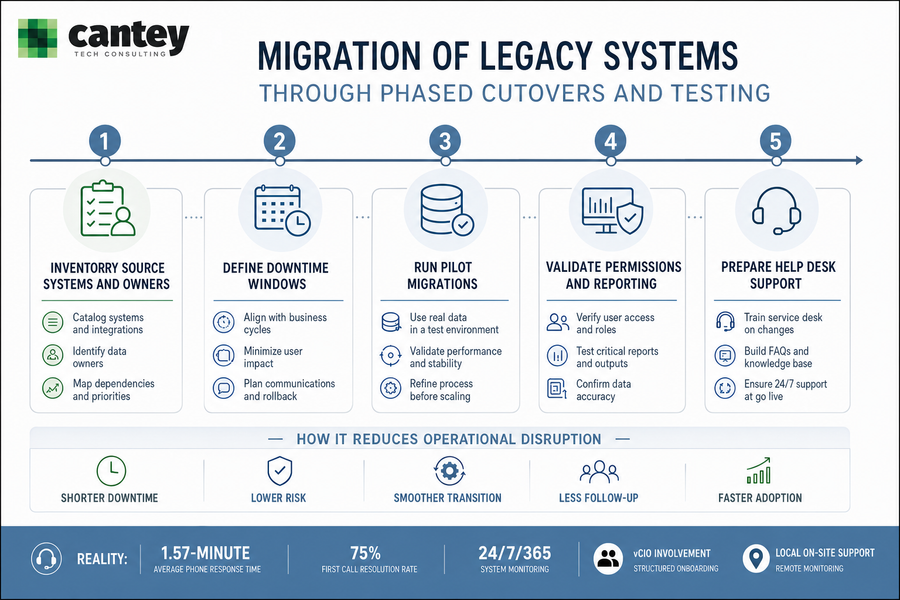
Migration Of Legacy Systems Through Phased Cutovers And Testing
A phased migration of legacy systems gives your staff room to keep serving customers while technical teams validate data, permissions, reports, and support steps. Rushed cutovers leave too many questions for go-live morning.
-
Inventory systems and owners: List source applications, shared folders, databases, and the business owner for each. Include who approves changes to invoice, HR, and customer records.
-
Plan downtime around cycles: Avoid payroll, billing runs, board reporting, and customer renewal deadlines when setting cutover windows.
-
Pilot with real data: Test a sample of invoices, documents, user accounts, and service records so exceptions appear early.
-
Validate access and reports: Confirm that managers see the right dashboards and staff can open the files they need, not more.
-
Prepare help desk go-live support: Service desk readiness, remote monitoring, vCIO input, and local on-site support reduce the follow-up burden on your internal team.
Our service desk has a 1.57-minute average phone response time, which matters when a cutover question affects billing, approvals, or customer service.
Legacy System Migration Planning For Sharepoint, Teams, And Core Platforms
Legacy system migration often connects old file shares, document libraries, chat channels, and business applications. Collaboration migrations require technical and human planning because staff don’t just need files moved; they need to know where work happens on Monday morning.
-
SharePoint structure matters: Protect business-critical information, preserve permissions, and maintain folder logic where it supports how teams search, approve, and retain documents.
-
Teams workflows need planning: Before a Microsoft Teams migration, plan channels, files, user access, meeting habits, and communication handoffs so work doesn’t scatter across old and new locations.
-
Adoption follows clarity: Training should show staff where invoices, project files, customer notes, and approval documents now live.
For SharePoint and Microsoft Teams projects, we focus on data integrity, minimal business disruption, and practical user guidance.
Plan Your Legacy Systems Migration With Cantey Tech Consulting
A well-planned legacy systems migration gives you cleaner data, lower downtime risk, better reporting, clearer ownership, stronger security, and smoother staff adoption across invoices, customer records, approvals, and shared files. If you’re planning a move from older platforms, Cantey Tech Consulting can help with assessment, migration execution, staff training, tailored security, 24/7/365 monitoring, and local on-site service.
With over 15 years of experience, over 350 clients, and a 75% first call resolution rate, we bring practical structure to projects that affect real people doing real work. Contact us when you’re ready to move from conflicting records and stalled approvals to a migration plan your staff can actually use.