


Table of Contents
-
Information Security Strategies That Start With Business Risk
-
Building An Information Security Strategy Plan Your Team Can Actually Use
-
What A Strong Information Security Strategy Controls Day To Day
-
An Information Security Strategy Example For Growing Operations
-
Turning Strategies For Information Security Into Measurable IT Habits
User access now runs through cloud apps, remote devices, vendor portals, shared drives, AI tools, and approval workflows. Your team still needs clean audit evidence, reliable backups, useful alerts, accurate invoices, and secure customer handoffs.
Hunter Roark, CIO at Cantey Tech Consulting, notes: “I’ve spent 18 years building and running security programs for our clients, and the lesson never changes. If a control doesn’t show up in a ticket, an approval, or a restore test, it’s a policy, not protection.”
That is why information security strategies belong in operational planning, not only in technical meetings. PwC’s Global Digital Trust Insights 2025 found that 77% of organizations plan to increase cyber budgets, while only 2% report firm-wide cyber resilience.
At Cantey Tech Consulting, we see an information security strategy plan as a practical way to reduce downtime, protect sensitive data, support compliance, and make IT spending easier to defend.
Information Security Strategies That Start With Business Risk
Security priorities should map to business risk before you select tools. Start with the systems that process money, store sensitive files, approve work, or keep customers served. That keeps security planning tied to downtime, data exposure, missed approvals, and customer impact.
-
Identify critical systems: List the applications, servers, cloud folders, and databases that affect payroll, invoicing, customer records, and service delivery.
-
Map access to roles: Match permissions to job duties. A billing user may need invoice exports, not admin rights to the finance platform.
-
Review vendor exposure: Check third-party portals, remote access paths, shared credentials, and integrations that move data outside your network.
-
Account for AI tools: Find out which AI tools employees already use, what data they paste into them, and which ones connect to your email, files, or CRM.
-
Prioritize operational risk: Rank gaps by their effect on approvals, customer handoffs, ticket queues, deadlines, and cash flow.
This gives you clear next steps you can approve, budget, and track without turning every risk discussion into a tool debate. Use risk assessments, vulnerability testing, access reviews, and security reporting to keep priorities tied to real business impact.
Building An Information Security Strategy Plan Your Team Can Actually Use
A plan fails when it sits in a document and never guides tickets, alerts, device policies, backup decisions, or audit evidence. A useful information security strategy shows who acts, when they act, and what proof gets saved.
-
Define clear security ownership: Assign owners for access, endpoints, cloud apps, AI tools, backups, and compliance evidence. We frame this through dedicated vCIO and vCISO guidance so decisions tie to budgets and operating risk.
-
Set access approval rules: Require manager approval for finance apps, HR files, shared mailboxes, AI tools, and vendor portals. Automate offboarding so access is removed the day HR records a departure, not when someone remembers.
-
Schedule patch and vulnerability reviews: Put patch windows and vulnerability reviews on the calendar. Monthly IT reviews help catch issues before they become support tickets or audit exceptions.
-
Document recovery expectations: Define which systems restore first, how often backups are checked, and who approves recovery steps.
-
Track audit evidence consistently: Save reports, exceptions, and remediation notes for SOC 2, NIST, CIS Controls, HIPAA, and PCI readiness.
Change takes coordination because users, managers, and vendors depend on the same systems. A practical roadmap gives each group a clear part to play without slowing every approval or helpdesk ticket.
What A Strong Information Security Strategy Controls Day To Day
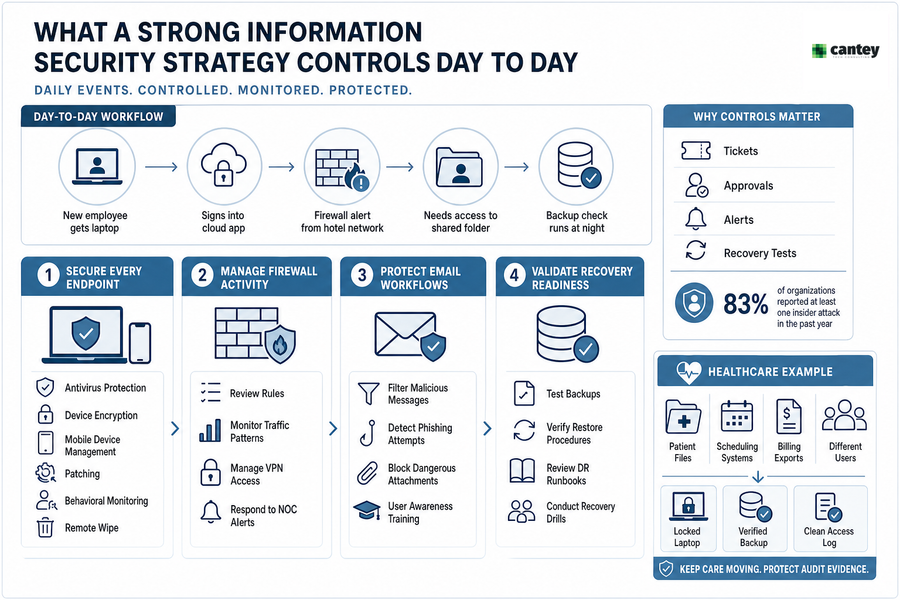
A new employee gets a remote laptop, signs into a cloud app, triggers a firewall alert from a hotel network, and needs access to a shared folder before a backup check runs that night. Daily controls turn that messy sequence into a managed workflow.
Controls matter because mature security is visible in ordinary tickets, approvals, alerts, and recovery tests. Insider risk also belongs here, since 83% of organizations reported at least one insider attack in the past year.
-
Secure every endpoint: Use antivirus protection, device encryption, mobile device management, patching, behavioral monitoring, and remote wipe for lost laptops.
-
Manage firewall activity: Review rules, traffic patterns, VPN access, and alerts so unusual connections are contained quickly.
-
Protect email workflows: Filter malicious messages and train users to spot fake invoice approvals, credential prompts, and file-sharing scams.
-
Govern AI use: Approve which AI tools are allowed, block unsanctioned ones, and keep client and patient data out of public models.
-
Validate recovery readiness: Test backups and disaster recovery steps before a server outage or ransomware event forces the issue.
In a healthcare office, patient files, scheduling systems, and billing exports all touch different users. A locked laptop, verified backup, and clean access log help keep care moving while protecting audit evidence. The same discipline helps managers approve access without handing out more permissions than each role needs.
Strengthen Your Security Strategy
Build Security That Supports Daily Work
Turn access, backups, alerts, and audits into practical habits with Cantey Tech Consulting. Keep protection aligned with how your team operates.
An Information Security Strategy Example For Growing Operations
A growing organization adds users, cloud apps, mobile devices, vendor portals, AI tools, and new compliance obligations. A practical information security strategy example starts with the work already happening, then tightens controls in phases. The goal is not a thicker policy binder. It is safer daily execution.
-
Assess systems and data flows Map where customer records, invoices, HR files, and vendor data move. Include cloud apps, endpoints, shared folders, AI tools, and API connections.
-
Close high-risk gaps first Prioritize exposed remote access, stale admin accounts, missing patches, and weak backup coverage. Focus first on gaps that disrupt invoicing, service delivery, or sensitive records.
-
Formalize policies and training Turn password, MFA, device, phishing, AI acceptable use, and data-handling rules into simple user expectations tied to real workflows.
-
Monitor and adjust monthly Review alerts, tickets, test results, and exceptions. Forrester’s Security Survey, 2023 found 27% of security decision-makers named improving security and privacy as their top IT priority.
Move from example to action with testing and reports that leaders can read, approve, and track. Use penetration testing, patch management, employee training, and incident response to turn the roadmap into scheduled work. We use certified expertise, tailored testing, confidential handling, and clear findings to align security work with business priorities.
Turning Strategies For Information Security Into Measurable IT Habits
Security improves when reviews, alerts, tickets, patches, training, and backup tests happen on a clear schedule. Repeatable habits reduce downtime because your team knows which access change, endpoint alert, or failed backup needs action before users start calling.
We use monthly IT reviews, 24/7/365 monitoring, local on-site support, and transparent reporting to keep those habits visible. Where we can, we automate them. When HR marks an employee as terminated, our workflows trigger the offboarding ticket and access removal instead of waiting on an email. The root problem is often governance, not tools, and that now includes AI. 63 percent of organizations have no AI governance policy at all, which means employees are choosing tools and sharing data with no one watching. Our Managed AI and vCISO teams treat AI usage like any other access risk: inventory it, approve it, and monitor it.
-
Review onboarding and offboarding access for cloud apps, shared mailboxes, AI tools and vendor portals.
-
Verify endpoint patch status for laptops, servers, and mobile devices.
-
Test backups and recovery steps for critical systems.
-
Review firewall and SIEM alerts, then link findings to tickets.
-
Document audit evidence, exceptions, approvals, and remediation dates.
Clear habits help everyone see what changed, who approved it, and what still needs remediation.
|
Operational Habit |
Primary Owner |
System or Evidence Source |
Escalation Trigger |
|---|---|---|---|
|
Reconcile user access against HR status changes every month |
IT administrator with HR manager approval |
Microsoft Entra ID, payroll export, ticket notes |
Active account found for a terminated employee or unapproved admin role |
|
Validate endpoint compliance before quarterly business reviews |
Service desk lead |
RMM dashboard, EDR console, patch deployment report |
Laptop missing critical updates for more than 7 days |
|
Run recovery verification for priority file shares and databases |
Backup engineer with department data owner |
Backup console, restore log, recovery checklist |
Failed restore test, corrupted file recovery, or undocumented recovery step |
|
Review high-severity network and identity alerts during monthly IT reviews |
Security analyst and account manager |
Firewall logs, SIEM cases, MFA risk events |
Repeated blocked login attempts, unusual VPN location, or malware beacon alert |
|
Review approved and unapproved AI tool usage each quarter |
vCISO with department leads |
AI usage reports, Entra ID app consents, acceptable use policy |
Unapproved AI app connected to company email, files, or client data |
|
Prepare audit-ready exception records for unresolved risks |
Compliance coordinator with executive sponsor |
Risk register, approval email, remediation ticket |
Exception past review date or missing business justification |
Keep Your Security Planning Practical And Moving Forward
Stronger security planning helps you reduce downtime, protect data, support audits, improve response, and make better IT decisions around systems, users, devices, networks, backups, AI tools, and compliance.
If user access, cloud apps, vendor portals, AI tools, and backup checks are creating too much noise, we can help you turn those moving parts into a practical security roadmap. Contact Cantey Tech Consulting for Managed IT, Managed Security, and Managed AI guidance backed by vCIO and vCISO planning, 24/7/365 monitoring, local on-site help, and transparent reporting your team can act on.