


Table of Contents
-
Cybersecurity Risk Assessment Checklist For Operational Clarity
-
Threat Assessment Checklist Cybersecurity Questions That Expose Workflow Risk
-
Cybersecurity Assessment Checklist Priorities For Business Impact
-
Assessment Checklist For Cybersecurity Follow Through And Remediation
-
Risk Assessment Checklist In Cybersecurity With The Right Partner
A cybersecurity assessment checklist helps you turn security questions into operational decisions. It gives you a clearer view of weak points across users, systems, vendor access, backups, endpoints, email, and compliance obligations before those gaps interrupt approvals, tickets, invoices, or customer handoffs.
Willis Cantey, CEO at Cantey Tech Consulting, notes: “The best assessment ties every risk to a real workflow, so leaders know which fixes protect revenue, approvals, customer data, and daily support first.”
That clarity matters because 86% of small businesses have performed a cybersecurity risk assessment and created some form of prevention plan, while the global average cost of a data breach in 2024 reached USD 4.88 million. With 15+ years of cybersecurity experience, we keep the focus on uptime, faster support, protected customer records, and decisions you can defend.
Cybersecurity Risk Assessment Checklist For Operational Clarity
Risk assessments should guide IT priorities, not sit in a folder. When spending decisions are unclear, remediation stalls and the same ticket keeps returning. A PwC study found only 45% of organizations are confident their cyber spend is aimed at the most significant risks, and only 42% think that spend delivers the best possible return.
Before you approve a budget, access change, or system upgrade, you need a clear view of people, process, and technology. Even though 86% of small businesses have performed a cybersecurity risk assessment and created some form of prevention plan, the plan still needs to connect to daily workflows. We look at how work moves through invoice approvals, customer records, remote access, and line-of-business systems. Then we connect findings to discovery, vulnerability scans, threat modeling, risk ranking, and continuous monitoring.
-
Role-based access checks: Confirm permissions match job duties, so former users cannot still reach customer payment files.
-
Device health review: Check laptops, desktops, and mobile devices for patch status, encryption, malware alerts, and performance issues.
-
Email exposure review: Review phishing risk, shared mailboxes, suspicious links, and training gaps.
-
Backup recovery expectations: Validate restore points against the downtime your team can tolerate.
-
Vendor access visibility: Review portals, VPN accounts, and third-party permissions tied to approvals or support.
Once priorities are visible, ask threat questions that show how disruption would unfold inside daily work.
|
Assessment Signal |
Operational Evidence to Collect |
Business Decision It Supports |
Typical Owner or Handoff |
|---|---|---|---|
|
Privilege drift in finance workflows |
Microsoft 365 role exports, QuickBooks admins, invoice approval matrix, terminated employee access report |
Remove unnecessary approvers before changing payment limits or adding accounting staff |
Controller reviews; IT administrator changes access |
|
Unpatched devices used for customer work |
RMM patch status, antivirus alerts, encryption report, mobile device enrollment list |
Delay a customer portal rollout until sales and service devices meet baseline standards |
Service desk remediates; operations confirms coverage |
|
Weak recovery proof |
Backup logs, last restore test, recovery time objective for ERP and shared files, offsite retention settings |
Approve backup upgrades based on payroll, orders, and support downtime tolerance |
IT validates restore; CFO approves spend |
|
High-risk vendor connectivity |
VPN user list, remote support audit, vendor MFA status, after-hours access ticket history |
Require time-bound access for copier support, MSP tools, payroll vendors, and consultants |
Procurement updates requirements; IT enforces controls |
|
Unclear incident escalation path |
Help desk escalation rules, cyber insurance contact sheet, executive call tree, phishing report timeline |
Define who can isolate systems, notify customers, contact counsel, and approve emergency communications |
COO owns plan; legal, IT, and department heads confirm roles |
Threat Assessment Checklist Cybersecurity Questions That Expose Workflow Risk
A controller clicks a suspicious email while reviewing an overdue invoice. The link opens a fake sign-in page, and the attacker now has a path into a shared mailbox used for approvals. Work slows while IT reviews access, resets credentials, and checks whether customer records were exposed.
Treat this review like a workflow walk-through. Follow invoice approvals, customer records, shared mailboxes, remote users, vendor portals, and ticket escalation from start to finish. The goal is to see where one compromised login or unpatched device interrupts work people depend on every day.
Threat questions should be tied to business impact because technical alerts do not carry equal weight. A locked payroll system, a disabled dispatch platform, and a suspicious vendor login all require different decisions. Cyber incidents are a leading interruption concern, with 45 percent of experts naming them the most feared cause of business interruption.
-
Sensitive record access: Which users can open customer, employee, financial, or regulated data?
-
Revenue-critical systems: Which applications stop billing, scheduling, order entry, or approvals if unavailable?
-
Immediate response alerts: Which EDR, firewall, email, or login alerts require ticket escalation right away?
-
Vendor system access: Which partners can reach internal systems, portals, or file stores?
-
Training by risk: Which employees need coaching based on phishing clicks or risky data handling?
At Cantey Tech Consulting, we use this cybersecurity risk assessment checklist as a practical support tool. It is backed by 75% first call resolution, a 1.57 minute average phone response time, and experience supporting 350+ clients.
Cybersecurity Assessment Checklist Priorities For Business Impact
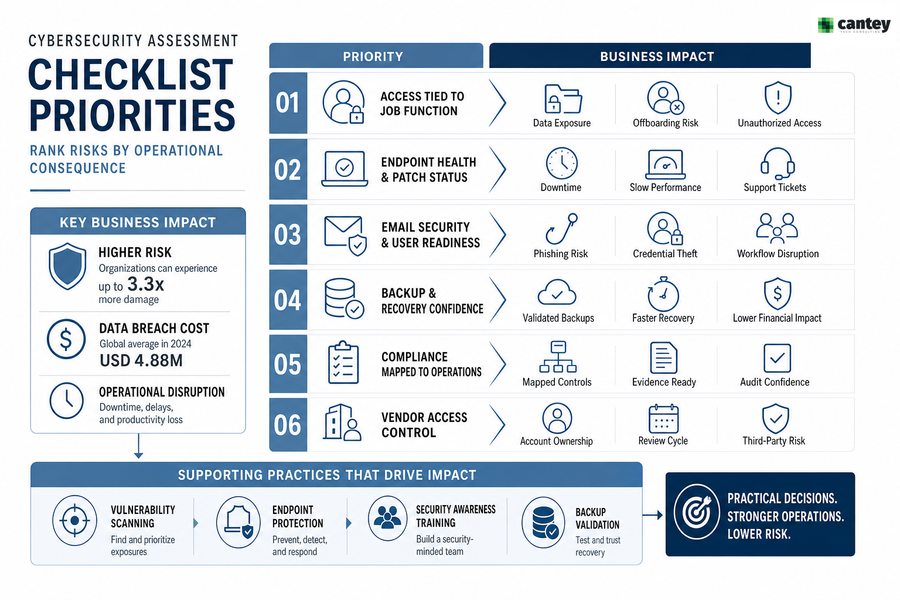
A useful assessment ranks risks by operational consequence, not technical noise. Use a threat assessment checklist cybersecurity review to separate urgent workflow risk from background noise. That matters when cyber damage is shaped by attack pressure and exposure, with the highest-risk organizations experiencing up to 3.3 times as much damage as the lowest.
-
Access tied to job function
Excess permissions widen exposure and make offboarding harder. If a former project manager still has file share access, customer data and proposals remain at risk.
-
Endpoint health and patch status
Unpatched devices create downtime, slow computers, and avoidable support tickets. A laptop that freezes during approvals costs time before anyone talks about malware.
-
Email security and user readiness
Phishing exposure leads to invoice fraud, credential theft, and interrupted workflows. Shared mailboxes need extra attention because several users touch the same messages.
-
Backup and recovery confidence
Backup testing proves whether leadership can trust recovery timelines. The global average cost of a data breach in 2024 reached USD 4.88 million, so recovery assumptions need proof.
-
Compliance mapped to operations
CMMC, NIST, HIPAA, PCI, and SOX obligations should map to real systems, records, approvals, and evidence requests.
-
Vendor access control
Third-party access affects approvals, core systems, and customer data. Every vendor login needs an owner and review cycle.
With dedicated vCIO guidance, proactive monitoring, and service delivery support, each finding can move toward a practical decision. Common capability areas include vulnerability scanning, endpoint protection, security awareness training, and backup validation.
Related Cybersecurity Risk Reads
Assessment Checklist For Cybersecurity Follow Through And Remediation
Fixing security gaps takes planning because IT changes touch users, schedules, approvals, and daily workflows. A patch can interrupt payroll. A new login rule can delay a vendor portal if employees are not ready.
Remediation should be sequenced by urgency, business impact, and available support capacity. Pace matters. In 2024, 24% of respondents said they conduct vulnerability assessments more than four times per year, up from 15% in 2023, which shows how often findings need review and follow-through.
-
Assign finding owners: Name the person responsible for each access change, patch, policy update, or backup test.
-
Separate urgent fixes: Handle active malware, exposed accounts, failed backups, and high-risk vulnerabilities before roadmap work.
-
Schedule around operations: Patch servers, laptops, and line-of-business systems outside key billing, shipping, or approval windows.
-
Test recovery first: Restore files and systems before assuming a backup will protect uptime.
-
Train by behavior: Focus awareness training on phishing patterns, file sharing habits, and risky approval workflows.
We support this work through structured onboarding that includes a systems review, audit, and long-term plan with vCIO input. We also add capacity for internal IT teams through co-managed IT, with proactive tracking for patching, malware detection, backups, and device performance.
Revisit findings regularly. Only 40% had high confidence their team was prepared to handle a cyberattack, so leadership needs a living plan rather than a one-time checklist.
Find Risks Before Work Stops
Turn your cybersecurity checklist into clear IT priorities with Cantey Tech Consulting, from access gaps to backups and remediation steps.
Risk Assessment Checklist In Cybersecurity With The Right Partner
A risk assessment checklist in cybersecurity gives you a practical way to clarify risk, protect customer data, reduce workflow disruption, and guide smarter IT planning across access, endpoints, email, backups, vendors, and compliance work.
If your team is not fully confident, you are not alone. Only 40% had high confidence their team was prepared to handle a cyberattack, which is why we help move findings into action through proactive monitoring, vCIO guidance, 24/7 support, and local IT support teams with no outsourcing.
At Cantey Tech Consulting, we bring 15+ years of cybersecurity experience, support for 350+ clients, a 75% first call resolution rate, and a 1.57 minute average phone response time to full-service IT support across hardware, software, data, process, people, and strategy.
If you want a clearer path from assessment to remediation, contact Cantey Tech Consulting and we will help you protect uptime, speed up support, smooth approvals, and reduce the security issues that interrupt daily work.