


Personal devices now touch nearly every workflow: remote logins, mixed Mac and Windows laptops, mobile email, cloud file sharing, approvals, customer records, and travel work. More than 80% of companies let employees use personal devices for work, and almost half were breached through them. That makes BYOD risks an access control issue, a helpdesk issue, and a data protection issue. At Cantey Tech Consulting, we see BYOD security risks show up in lost phones, employee exits, compliance gaps, and unmanaged apps.
Hunter Roark, CIO at Cantey Tech Consulting, notes: “Almost every BYOD conversation I have starts the same way: nobody knows how many personal devices touch company data. Get that list first, then tie access to role and exit status. Otherwise you find out the hard way, when someone leaves with your customer list still on their phone.”
Where BYOD Risks Show Up During The Workday
BYOD issues are hard to spot because personal devices often touch business systems without appearing in asset records, warranty lists, or support queues. If 90% of companies allow access to corporate apps from BYOD devices, the risks of BYOD sit inside ordinary work, not only security alerts.
-
Microsoft 365 access: A personal laptop signs into email and SharePoint, but IT has no device age, patch level, or encryption record.
-
Email attachment storage: A phone downloads HR forms, invoices, or customer files that remain after the project ends.
-
Unmanaged browser sessions: Saved passwords and open tabs keep CRM or accounting access alive after a role change.
-
Home WiFi and apps: Staff move files through personal chat or storage apps when VPN access feels slow.
Monthly IT reviews, asset tracking, MDM, and endpoint security keep device visibility current so hidden access does not become stale risk.
Why BYOD Security Risks Grow Without Device Controls
Unmanaged devices create business risk when they connect to email, accounting platforms, CRMs, shared drives, and customer records. The gap is clear: 85% of employees say employers secure company-issued devices, while only 49% say the same for personal devices used for work. That gap turns ordinary bring your own device to work security issues into delayed tickets, unclear access, and exposed data.
Picture a traveling sales employee approving invoices from a personal phone, opening customer pricing in the CRM, and downloading a proposal over hotel WiFi. If that device is lost, IT needs to know what was accessed, which apps stored data, and what can be removed before the next customer follow-up.
MDM means plain rules: approved apps, encryption, access limits, remote wipe, and deprovisioning. We use it to make onboarding cleaner, offboarding safer, and support calls easier to resolve. That matters because infostealer logs show 30 percent of compromised endpoints belonged to licensed enterprise devices, while almost half were unmanaged machines storing both personal and corporate credentials.
The Risks Of BYOD During Onboarding And Offboarding
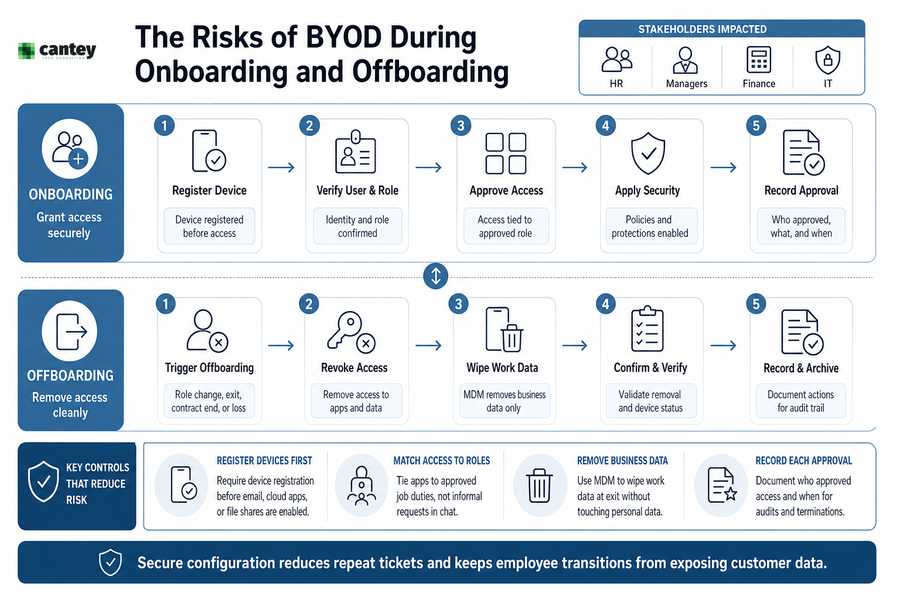
BYOD policies affect HR, managers, finance, and IT because access approvals often move through different workflows. A hiring manager may approve Microsoft 365, finance may approve expense software, and IT may receive the device ticket after the employee already starts. That is where problems with BYOD become day-one friction and exit risk.
The practical goal is simple: give people the access they need, then remove it cleanly when the role changes, a contractor leaves, or a phone is lost.
-
Register devices first: Require device registration before email, cloud apps, or file shares are enabled.
-
Match access to roles: Tie apps to approved job duties, not informal requests in chat.
-
Remove business data: Use MDM to wipe work data at exit, triggered automatically when HR records the departure, without touching personal photos or contacts.
-
Record each approval: Document who approved access and when so audits and terminations do not become guesswork.
Secure configuration reduces repeat tickets and keeps employee transitions from exposing customer data.
More On BYOD Risk Reduction
Business Costs Behind BYOD Risks And Issues
BYOD costs show up as downtime, duplicate tools, delayed support, compliance gaps, and unclear vendor or warranty ownership. The security risks of BYOD become operating costs when access and device ownership are not clear. Almost two-thirds, 63%, of survey respondents cautioned that unsecured sensitive business information and communications could bring financial or regulatory penalties.
-
Slower personal device troubleshooting: If IT lacks the model, OS, owner, and app history, a simple access ticket takes longer. The employee waits.
-
More compliance evidence gaps: Audits for SOC 2, NIST, CIS Controls, HIPAA, or PCI require proof of access control, not assumptions.
-
Higher unpatched app exposure: Browser plug-ins, mail apps, and file tools need patching before one device becomes the weak link.
-
Messier vendor and warranty tracking: We help manage vendor relationships and asset lifecycle details so replacement decisions do not become budget surprises.
-
More downtime after loss: Verizon found 53 percent of firms hit a mobile incident causing data loss or downtime. Backup and recovery planning shortens the scramble.
Control BYOD Risk Before It Spreads
Personal devices can expose business data in everyday workflows. Cantey Tech Consulting helps you build safer access, policy, and support controls.
Solving Problems With BYOD Through Layered Security
A strong BYOD program does not depend on one tool. It stacks practical controls around the way people actually work, such as a project manager reviewing Teams files from a tablet or a controller approving payments from home.
Move from loose access to managed capability.
Use MDM, endpoint security, secure remote access, backup and disaster recovery to control BYOD risks and issues without slowing routine work.
Those controls work best with device encryption, patch management, remote wipe, and helpdesk support tied to policy. VDI or Managed Desktop can also reduce exposure because users access a full desktop experience without storing every file directly on a personal laptop. For remote staff, approved apps and shared folders stay reachable while IT keeps better control over where business data lives.
Reducing Bring Your Own Device To Work Security Issues With Policy And Support
Policy works when users can follow it without slowing daily work. If a personal phone blocks MFA before a customer call, the process needs a fast support path, not a long email chain. According to JumpCloud research, 60% of IT professionals consider security their top BYOD concern, while 84% worry about shadow IT.
-
Approved devices and OS: Define which Mac, Windows, iOS, and Android versions can access company systems.
-
MFA and password rules: Require strong sign-in controls for email, VPN, accounting, and CRM access.
-
App and browser limits: Block risky storage, browser, or messaging tools from handling work files.
-
AI apps on personal devices: Decide which AI assistants can touch work data, and keep personal AI apps from reading company email, files, or customer records.
-
Backup expectations: Clarify what is backed up and where approved business data must live.
-
Helpdesk process: Pair policy with support. Our helpdesk averages a 1.57-minute response time and a 75.26% first-call resolution rate, which help reduce stalled employees when BYOD security risks interrupt access to business systems.
Build A Practical Plan For The Security Risks Of BYOD
BYOD can support flexibility when access, devices, data, backups, and user support are managed together, not handled as separate tickets after something goes wrong. Start with visibility.
At Cantey Tech Consulting, we help you turn BYOD risks into a managed operating model through dedicated vCIO and vCISO guidance, monthly IT reviews, Managed Security, MDM, backup and recovery, and 24/7/365 helpdesk support. Contact us for a practical review of your current BYOD setup, from the lost-phone scenario to the approvals and customer records your teams depend on every day.